Touch Analytics can produce AQI XML for NACOR minimum data reporting. This configuration requires per-case data entry (in macros) of data points, including the following: anesthesia times, anesthesia type, ASA, anesthesia CPT codes, surgical CPT Codes, ICD 10 codes, and Payment Method. These data fields must all be present in macros during the desired period.
In addition to per case data entry, the Provider ID and NPI must be set in WebAdmin for all users. The AQI practice ID, practice name, practice TIN (singular), and submitter information are set when preparing the export.
After specifying the start and end time for the export and running it, the data may be downloaded as an XML file.
Prerequisites for XML Export
Prerequisites for export include the following:
- Macro configuration with all data elements added prior to the desired period
- Touch Analytics configuration request to ensure that all added Concepts have been loaded and included in daily data exports
- The required values for the export (Practice ID, TIN, and submitter information)
This tool generates 2019 XML to be downloaded.
Creating the XML Export
To create the export, login to Touch Analytics and do the following:
- From the landing page, select “Utilities” (select the “Touch Analytics” header link in the upper left if not viewing the landing page)
- If not taken to the “AQI Exporting” page, select it from the presented options
- Under “Facility Details,” enter the necessary data:
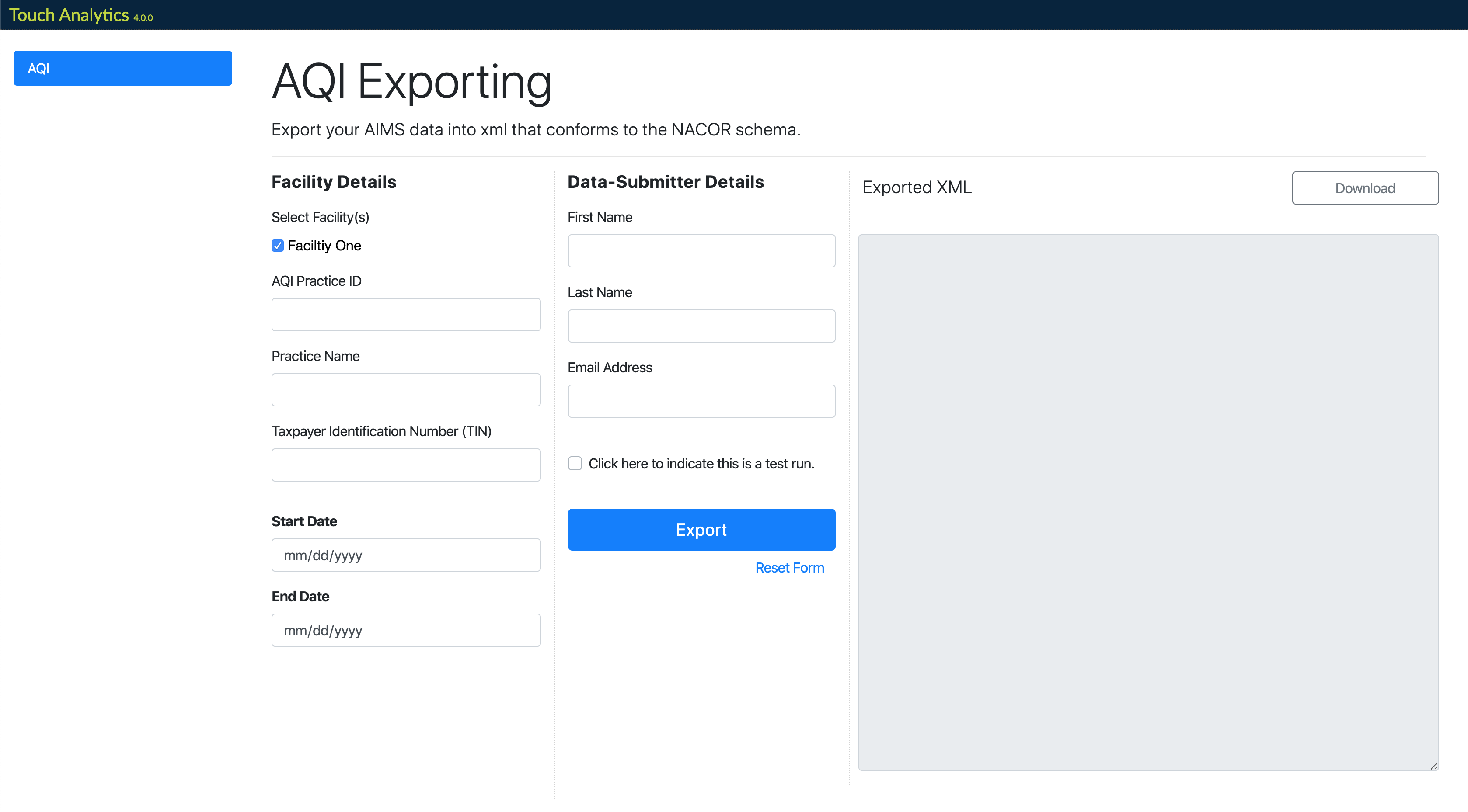
- Select the facilities to include in the report (these will match the facilities configured in Touch Analytics)
- Enter the AQI assigned Practice ID, Practice Name, and the TIN
- Enter the Start and End Dates for the exported data
- Under “Data-Submitter Details” enter the first and last name and email address of the party submitting the data to AQI
- Select the “Export” button
- After Touch Analytics has generated the XML, you may review it in the browser before selecting “Download” for the XML file
If the data is intended as a test only, select the checkbox next to “Check here to indicate this is a test run.” This will automatically name the downloaded XML file in the testing convention AQI expects (“_TEST(Y)” will be appended to the filename).
After exporting, select “Touch Analytics” in the header to return to the landing page.
Comments
0 comments
Article is closed for comments.